

You are here at best place to download a free assessment report template to save your time while writing an assessment report.
A document prepared by individuals, professionals and other experts to identify qualities, abilities and areas of improvement of a person, company, business or any other thing is known as assessment report.
Assessment reports are different in types according to their objectives and used in extensive fields of life. For example in academic institutes and organizations, assessment reports play an important role to demonstrate useful information about a student like what kind of knowledge a student have, what he can do well as well as recommendations for improvements for future if required any.
Health assessment report, personal assessment report, business assessment report, product assessment report and work assessment report are some major and common types of assessment reports.
Most of businesses and companies are mostly depended on assessment reports to take important business decisions and steps. You will like this Assessment Report template.
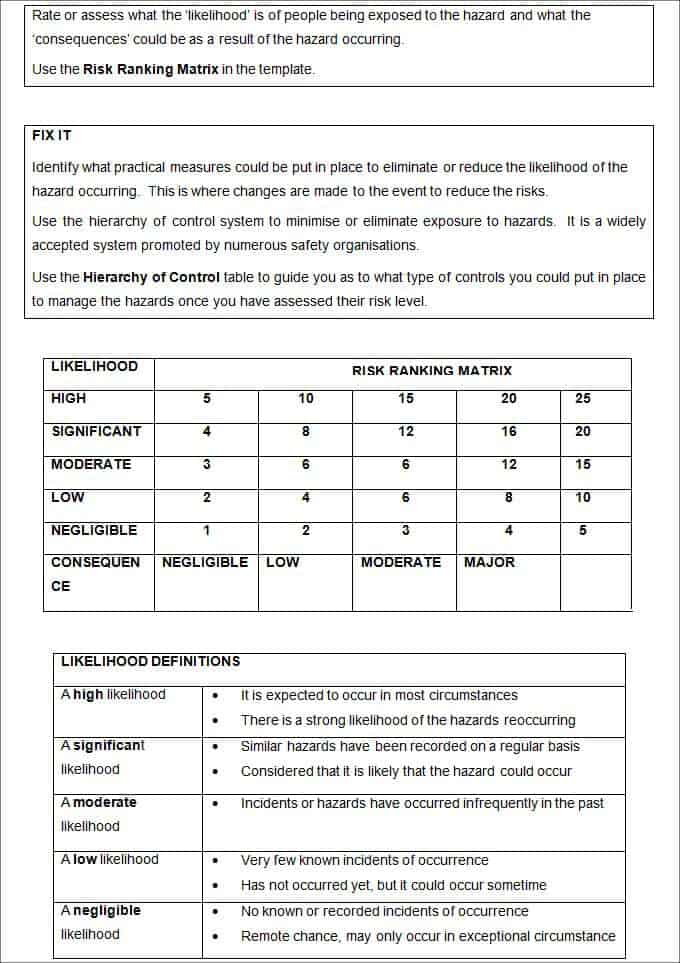
An assignment report may consist of title and objective of the assessment, data used to conduct the assessment, methodology, obtained results and other important details.
As an assessment report writer you should add recommendations and suggestions for improvements to make things better than before. An assessment report should be based on facts and in an easily understandable format.
As a fresher you may face bit confusion and troubles to prepare a successful assessment report as it is part of technical writing. Wide range of assessment report templates is accessible on internet that anyone can use to get assistance while writing an assessment report.
Assessment report template is a document equipped with necessary fields that aid a user to insert personal details and information easily.
An elegantly generated assessment report template is waiting here for you, so download for free and start writing of error free assessment reports.
Download Assessment Report template:

Two More Free Assessment Report Templates
This page includes three downloadable assessment report templates with different layouts. Choose the format that fits your workflow and customize it before use.
Simple Assessment Report Template
This editable Word template uses a structured table layout for assessment report tasks.

Download Simple Assessment Report Template
Sectioned Assessment Report Template
This Word alternative uses a distinctly different sectioned fill-in layout.

Download Sectioned Assessment Report Template
How to Use These Assessment Report Templates
An assessment report should explain not only the result, but how it was reached and what action the result supports. The resource is designed for teachers, consultants, HR teams, evaluators, and project reviewers.
Before editing, decide who will complete the document, who will review it, and what final record must be retained. That small planning step prevents a visually polished file from becoming difficult to use in practice.
Choose the Right Version for the Task
Start with the layout that matches the real workflow rather than choosing only by appearance. Common applications include skills assessment, needs analysis, performance review, site evaluation, and program assessment. A short, frequently used document should be easy to scan and complete.
A formal record may need more instructions, approvals, references, and space for supporting details.
Download a clean copy before making changes. Rename the working file with a meaningful project, client, class, or reporting-period reference. Keep an untouched master so future versions do not inherit old names, amounts, dates, or confidential information.
Important Details to Include
Review every label before distribution. Depending on the selected layout, useful information normally includes:
- purpose and scope
- subject or population
- criteria and method
- evidence and observations
- ratings or findings
- recommendations, priorities, and follow-up
Remove fields that do not serve a genuine purpose and add any information required by your organization. Clear labels are more useful than dense instructions. If several people will use the file, include a short example or completion note wherever a field could reasonably be interpreted in more than one way.
A Reliable Customization Workflow
- Define the purpose. Write one sentence explaining the decision, transaction, activity, or record the document must support.
- Confirm the audience. Adjust vocabulary and instructions for the person completing the form and the person reviewing it.
- Edit the structure. Keep the relevant sections, remove unused placeholders, and add approval or reference fields only where needed.
- Test the document. Complete one sample with realistic information to check spacing, calculations, page breaks, and print quality.
- Control the final version. Add a revision date or file version, protect formulas where appropriate, and save completed records securely.
Quality and Accuracy Checks
Check spelling, dates, numbering, totals, names, and terminology before using the finished file. Make sure table columns remain readable after editing and that important text does not move onto an unexpected page.
For Excel files, test formulas with several values, including zero, discounts, and unusually large figures. For Word files, review both the editing view and a PDF or print preview.
The most important issue to avoid is using unsupported ratings or recommendations that are not connected to the stated criteria and evidence. Use consistent formats for dates, currency, units, and names.
If the document affects money, employment, legal rights, health, safety, or official records, have an authorized person review it before release. A downloadable template is a starting point and should be adapted to applicable policies and local requirements.
Saving, Sharing, and Maintaining the File
Use a predictable filename and store completed copies in a location with appropriate access controls. Avoid emailing editable files containing sensitive information when a secure system is available. If signatures are needed, state whether typed, handwritten, or approved electronic signatures are accepted. Archive final copies separately from blank masters.
Review the template whenever the process, responsible person, pricing, policy, regulation, or branding changes. Periodic review keeps the document accurate and reduces the chance that staff continue using an outdated copy. These practical controls make the template easier to reuse and more dependable as an operational record.
Frequently Asked Questions
What should an assessment report include?
An assessment report should state the purpose, criteria, evidence, findings, strengths, improvement areas, recommendations, and follow-up actions.
Can I edit these assessment report templates?
Yes. Customize the sections for the person, process, organization, product, or activity being assessed.
How should assessment findings be supported?
Base findings on documented criteria, reliable evidence, observations, records, and clearly explained reasoning.


